

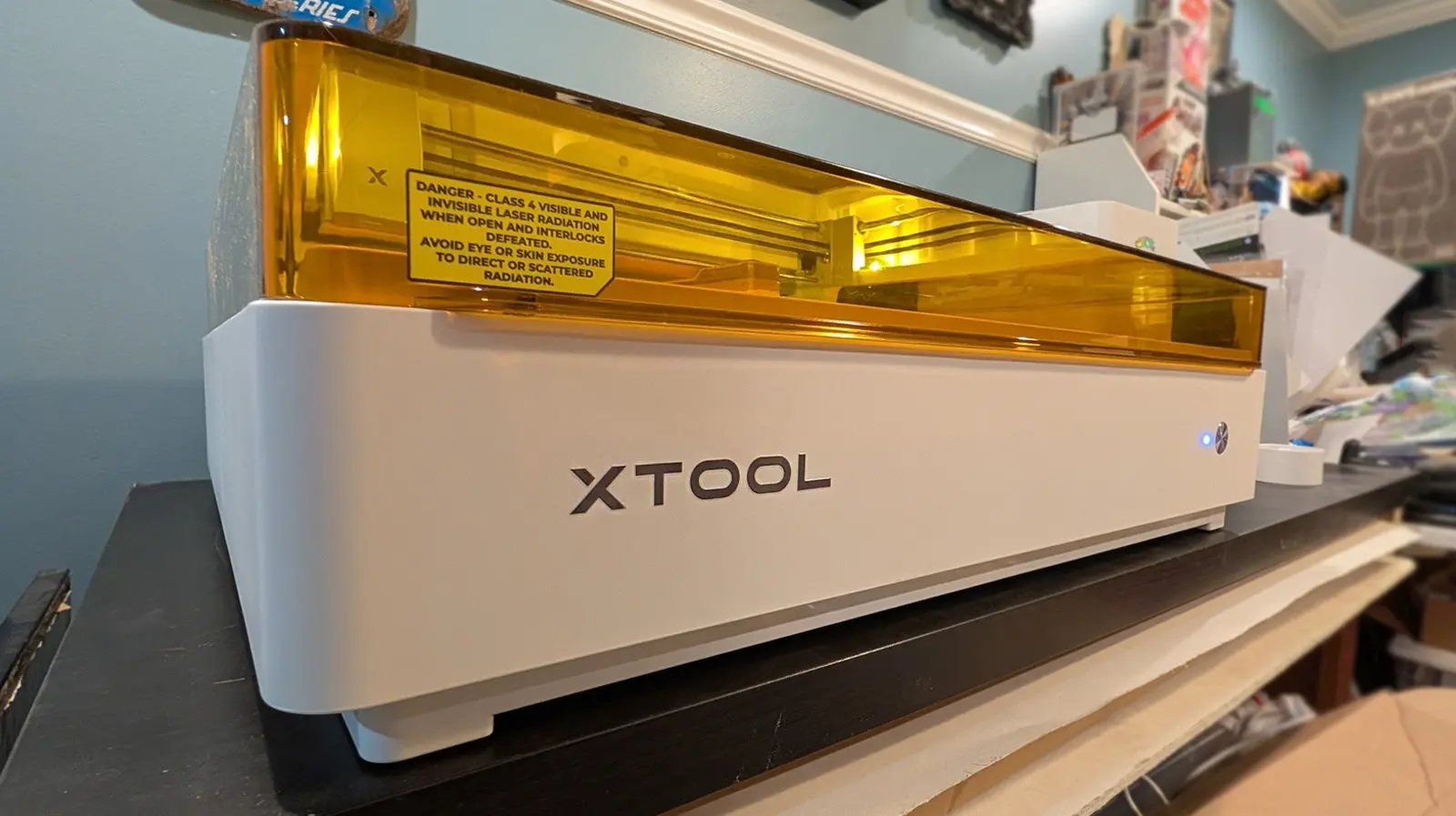
xTool M2: A Space-Saving Solution for DIY Enthusiasts?
Desktop DIY gadgets have long suffered from a fundamental problem: they take up valuable workspace. The xTool M2 enters the market as a multifunctional device that combines laser cutting and inkjet printing, promising to reduce the footprint of multiple machines. But does it deliver on its space-saving promise? This review examines the M2's capabilities, limitations, and how it fits into the broader landscape of creative tools.
The xTool M2 is the latest in a line of similar tools from the brand, following the xTool M1 Ultra released in 2024. Both devices are designed to perform multiple functions, but the M2 introduces a modular system with magnetic quick-swap attachments for laser and ink modules. The base model costs $550 and includes a 10W blue diode laser, while a $700 bundle adds the CMYK inkjet printing module. Higher-power laser modules (20W blue diode and a 3W IR laser) are available separately, though the 20W laser for the M1 Ultra is now sold out.
Key Features and Design
The M2 measures 24 x 22.4 inches with a processing area of 16.7 x 12.5 inches, slightly larger than the M1 Ultra's 11.8 x 11.8 inches. Both machines take up significant desk space, but the M2's larger interior allows for bigger projects. Swapping modules is straightforward: unplug a USB-C cable, magnetically attach the new module, and reconnect the cable. However, this magnetic system means the M2 cannot use tools that require physical pressure—such as pens, blades, or foil transfer attachments. Users needing those features must look to the M1 Ultra, which comes with a rotary blade, fine-point blade, cutting blade, pen holders, and foil transfer tip.
The inkjet module uses a proprietary 40ml cartridge costing $99, significantly larger than the 15ml cartridge in the M1 Ultra. It can print on various materials, including paper, cardstock, temporary tattoo paper, and pretreated wood, canvas, glass, acrylic, and satin fabric. However, prints are water-soluble, making them unsuitable for washable fabrics. Color controls are limited compared to traditional printers, and the machine does not support third-party printing apps.
Space-Saving in Practice
The primary selling point of the M2 is its ability to replace multiple standalone devices. A typical workshop might house a laser cutter, a vinyl cutter, and an inkjet printer, each occupying its own footprint. By combining laser cutting and inkjet printing, the M2 reduces that to one machine. However, because it cannot use physical pressure tools, users who also need cutting or foil transfer may still require additional devices. The M1 Ultra, at $900, offers more versatility with its included drawing and cutting capabilities, but its smaller processing area and older design limit its appeal.
Both machines require about the same desk space—roughly 24 by 20 inches—so the M2 does not significantly shrink the footprint compared to its predecessor. The real space savings come from avoiding the purchase of separate laser and inkjet machines. For users who primarily need laser engraving and occasional color printing, the M2 is a viable all-in-one solution.
Software and Ecosystem
xTool's Studio software is a key advantage over competitors like Glowforge. The desktop application works offline and does not require an internet connection, offering greater reliability and privacy. It is user-friendly and supports complex design imports. The software is regularly updated and integrates with the xTool ecosystem, which includes larger machines like the xTool F2 (a portable laser engraver) and the professional-grade P series. The M2's modules are currently limited to this device, but future cross-compatibility could enhance long-term value.
Performance and Practical Considerations
The 10W laser performs admirably on wood, acrylic, leather, and other materials, with crisp cuts and clean engravings. The 20W laser (available as an add-on) speeds up cutting and can handle thicker materials. The 3W IR laser is designed for metals and plastics, though it is not yet shipped. The inkjet module produces acceptable color prints on flat surfaces, but the need for pre-treatment on non-porous materials adds time and cost. The water solubility of prints limits their durability, making the M2 best suited for prototypes, decorations, and temporary uses.
One notable drawback is the absence of paper feed or rollers, meaning the printer handles one piece at a time. This is fine for single projects but inefficient for bulk printing. The cartridges, while larger, still represent a recurring expense. For comparison, the M1 Ultra's smaller cartridge was often criticized for running out quickly, and the M2's larger cartridge may last longer, but precise longevity depends on usage patterns.
Longevity and Future Prospects
The xTool M2 is clearly positioned as a stepping stone. The article suggests that an eventual 'Ultra' version of this platform may combine the best features of both the M1 Ultra and M2—including physical pressure tools—while maintaining the larger processing area. xTool has not confirmed such a model, but the discontinuation of the 20W laser for the M1 Ultra hints at a shift in focus. Until then, buyers must choose between the M2's modular simplicity and the M1 Ultra's broader toolset.
For users willing to compromise, the M2 offers a solid start. It effectively addresses the space issue by merging two common workshop functions into one machine, though it cannot replace every tool. The growing trend of multifunctional DIY gadgets reflects a broader industry shift toward compact, all-in-one solutions. As desktop workshops become more common—driven by hobbies like laser engraving, 3D printing, and electronics—the demand for space-efficient devices will only increase. The xTool M2 represents a meaningful step in that direction, even if it does not fully solve the problem.
Source:SlashGear News